
Mobile Self-Service: Why Access to Time Off & Accrual Data Builds Employee Trust
When employees have to email HR to find out their PTO balance, something has already gone wrong. That friction, small as it seems, erodes trust over time. It signals that the information employees need to make basic life decisions is locked inside a system they cannot access.
Research from Gallup consistently links employee engagement to whether people feel their employer treats them with respect. Access to personal pay and time data is one of the clearest signals an employer can send — and denying it sends just as clear a signal in the opposite direction.
Summary
Mobile self-service is a crucial retention strategy that builds employee trust by providing immediate, transparent access to personal data like PTO/accrual balances, pay stubs, and W-2s. This level of access reduces employee friction, significantly cuts down on HR administrative time, and is key to resolving payroll errors quickly—a necessity since errors are a primary driver of employee disengagement.
We identify essential features of good self-service, including real-time accrual visibility and integrated time-off request functionality. APS offers a mobile app that gives employees real-time access to pay and time-off data, supporting greater transparency and retention.
The Problem with Information Silos
In many organizations, HR and payroll systems hold data that employees directly need: current PTO balances, accrual rates, scheduled time off, pay stubs, and W-2s. But this information lives behind an admin login that only HR can access. Employees either wait for a response to an email, accept a verbal answer from a manager who may not have current numbers, or simply guess.
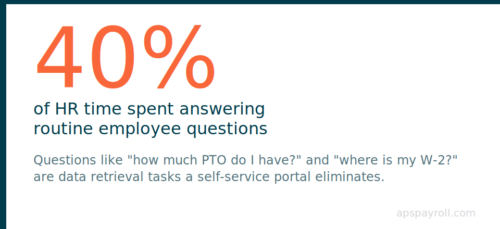
The resulting friction creates real operational costs. According to SHRM research, HR departments spend an estimated 40% of their time answering routine employee questions that a self-service portal would eliminate. For a three-person HR team supporting 200 employees, that is 1.2 full-time equivalents consumed by questions like “how much PTO do I have left?” and “where is my W-2?” Those are not questions that require HR expertise. They are data retrieval tasks that HR systems can answer instantly — if employees are given access.
The volume of these questions compounds around predictable moments: year-end, when employees want to confirm PTO will carry over or be paid out; open enrollment, when employees want to verify benefit elections; tax season, when W-2s become available; and the first paycheck after any pay change, when employees compare the new number against what they expected. HR teams that lack self-service tools absorb the full inbound volume of these moments every year.
Beyond the operational cost, there is a trust problem. When employees cannot verify that their accruals are correct, they tend to assume they are not. A small discrepancy — an accrual that looks a few hours low, a deduction that does not match memory — that goes unaddressed for months can become a significant grievance. It is not that employees are looking for problems. It is that uncertainty, left unresolved, tends to resolve pessimistically.
What Employees Actually Want to See
Not all HR data carries the same weight for employees. The highest-value items in a self-service portal are the ones tied to immediate financial and scheduling decisions.
Time-off and accrual data
- Current PTO, sick, and vacation balances
- Accrual schedule: how many hours earn per pay period
- Year-to-date accruals
- Upcoming scheduled time off
- Projected year-end balance based on current accrual rate
Pay and earnings data
- Current and historical pay stubs with full line-item detail
- Year-to-date earnings by pay type
- W-2 access and download
- Direct deposit and payment method on file
Benefits information
- Current benefits elections
- Open enrollment status and deadlines
- Dependent information
- FSA and HSA balances where applicable
Personal and contact information
- Current address, emergency contacts, and tax withholding elections
- Ability to update personal information directly (with appropriate approval workflows for payroll-sensitive fields)
When employees can access this data on their phone in under 30 seconds, they do not need to contact HR for routine questions. And when they can verify the data themselves, they catch errors quickly — which benefits both the employee and the payroll team. An employee who notices a missed accrual the day after a payroll run is catching a two-minute fix. The same employee who notices it three months later after a vacation request is denied has a much more complicated situation to resolve.
Why Mobile Matters More Than Desktop
The workforce that most benefits from self-service access is also the workforce least likely to have a company desktop: hourly employees, frontline workers, and distributed teams.
A hospital CNA checking her PTO balance before requesting time off is not sitting at a desk. A restaurant manager confirming his schedule on a Sunday night is not near a company computer. A warehouse associate reviewing his paycheck after a shift ends at 10 PM is doing it on his phone or not at all. A retail employee in a back-to-back shift stretch who wants to know if she has enough sick time to cover a doctor’s appointment is making that decision in a break room, not an office.
For these workers, a self-service portal that only works on a desktop browser is effectively no portal at all. They access it once, find it difficult to navigate on a phone screen, and never return. From that point on, the system exists for HR’s benefit — not theirs.
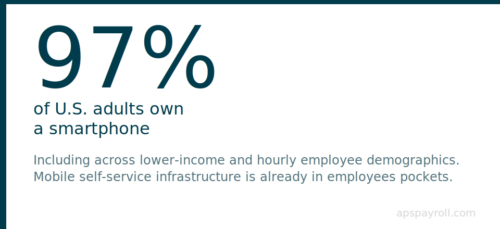
Smartphone ownership among U.S. adults is currently at 97%, including across lower-income and hourly employee demographics. The infrastructure is there. The question is whether employers give employees something worth using on it.
Mobile-first design requires more than a responsive layout that technically works on a small screen. It means:
- Load speed. Employees checking a PTO balance should not wait 10 seconds for a page to render. If the mobile experience is slow, usage drops sharply.
- Single-task clarity. The most common actions — check balance, request time off, view pay stub — should be reachable in two taps from the home screen. Deep navigation hierarchies designed for desktop use do not translate to mobile.
- Push notifications. Employees should not have to log in to find out that their time-off request was approved or that a new pay stub is available. A push notification eliminates the passive uncertainty that drives inbound questions to HR.
- Offline resilience. Employees in areas with unreliable connectivity — warehouse environments, healthcare facilities with signal restrictions, construction sites — benefit from apps that cache recent data locally so information is available even when the connection is not.
When evaluating a self-service solution, test the mobile experience as rigorously as the desktop interface. Better yet, have hourly employees — not the HR team — test it during the evaluation process. The people who will use the tool most frequently are the best judges of whether it actually works.
The Link Between Transparency and Retention
PTO and pay transparency directly affects whether employees stay. The connection works in two directions, and both are supported by data.
First, when employees can verify their balances in real time, they make better decisions about scheduling their time off — which reduces the unplanned absence problem. Unplanned absences are significantly more disruptive to operations than planned ones: they require scramble coverage, create overtime costs, and strain the team members who have to absorb the workload. When employees guess at their balances because they cannot check, they sometimes call in sick because they are unsure whether they have a vacation day available, or they hold onto leave they plan to take because they are worried about running short. Real-time visibility removes that uncertainty and allows employees to plan more deliberately.
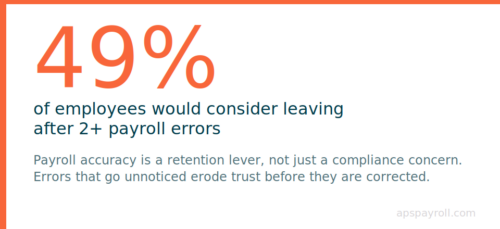
Second, payroll errors are one of the most reliable drivers of disengagement. Research shows that 49% of employees would consider leaving their job if they experienced two or more payroll errors. That is not an abstract statistic — it reflects the emotional response employees have when they feel their employer cannot be trusted to pay them correctly. When employees have self-service access to their pay stubs and can review the breakdown themselves, they catch errors early and can raise them before the next pay period rather than letting frustration accumulate.
Third, there is a signal value that goes beyond the operational. The decision to give employees access to their own data says something about how the organization views the employment relationship. It communicates: we trust you to have this information, and we expect you to use it to make decisions. That message registers with employees. Organizations that restrict access to basic HR data — even when the restriction is purely an oversight of system configuration — are sending the opposite message, whether they intend to or not.
A PwC study found that financial stress is the top source of stress for employees across all income levels, and that employees experiencing financial stress are nearly five times more likely to be distracted at work. Real-time pay and accrual visibility does not eliminate financial stress, but it removes a category of uncertainty that contributes to it: not knowing when the next paycheck arrives, not knowing how much PTO remains, not knowing whether a direct deposit went to the right account.
What Good Mobile Self-Service Looks Like
Not every self-service portal is built equally. The gap between a portal that employees actually use and one they abandon after the first interaction often comes down to a handful of design decisions.
Accrual visibility in real time. Balances should update after each payroll run, not just once a quarter. Employees making time-off decisions today need today’s data — not data from six weeks ago. A portal that shows a stale balance is not just unhelpful; it actively undermines trust if an employee makes a decision based on incorrect information.
Accrual schedule transparency. Showing the current balance is good. Showing the current balance plus the projected balance at the end of the year — assuming no additional time off is taken — is better. It helps employees plan vacation and personal time without needing to do the math themselves. Some employees hold on to leave because they are not sure how much they will earn before year-end. Projected balance data removes that uncertainty.
Time-off request integration. The self-service portal should allow employees to submit time-off requests directly, track approval status in real time, and see how an approval or denial affects their balance. A portal that only displays data but requires a separate email or paper form to actually request time off creates more friction than it removes. The entire workflow — request, approval notification, balance update — should live in one place.
Pay stub detail. Employees should see the full breakdown: gross pay, each tax withheld by type, each deduction by name, and net pay. A single net pay number tells them nothing about whether the calculation was correct. When an employee can see that federal withholding changed because they updated their W-4, or that a new benefits deduction started, they are less likely to call HR to ask why their check looks different.
Notification preferences. Proactive alerts reduce inbound contacts more than any other single feature. Employees who receive a push notification when a pay stub is available, when a time-off request is approved or denied, or when an accrual balance is approaching a use-it-or-lose-it threshold do not need to log in to find out. They are informed before they form a question.
Personal information management. Employees should be able to update their address, emergency contacts, and direct deposit information directly from the portal, within appropriate guardrails. Direct deposit changes and tax withholding updates should trigger an approval or confirmation workflow before taking effect — but the employee should not need to call HR to initiate the change.
Addressing Common HR Objections to Self-Service Rollouts
HR teams sometimes hesitate to expand employee access to HR data, particularly in organizations where payroll accuracy has been inconsistent or where data governance has not been a priority. The concerns are worth taking seriously, because they point to real implementation risks — but they are manageable.
“Employees will find errors and be upset.”
This is the most common objection, and it is worth examining carefully. If there are errors in the accrual or pay data, employees are better served by finding them quickly — when corrections are straightforward — than by discovering them months later when they have accumulated and the reconciliation is complex. The existence of errors is the problem. Hiding them from employees by restricting access delays the resolution and increases the liability.
“Employees will change sensitive information incorrectly.”
Reputable platforms use role-based access controls that separate view-only permissions from edit permissions. Employees can typically view all of their data but can only edit low-risk fields like address and emergency contacts without approval. Any change that affects payroll calculations — direct deposit routing numbers, tax withholding elections — requires a confirmation step or manager/HR approval before it takes effect.
“We don’t have the bandwidth to support rollout.”
The implementation effort for a well-designed self-service tool is front-loaded. After the first 60 to 90 days — when employees and managers are learning the system and the most common questions surface — inbound HR contacts related to routine data requests typically decline significantly. The short-term investment in rollout pays back in reduced administrative volume.
“Our data isn’t clean enough to show employees.”
If the data is not accurate enough to show employees, it is not accurate enough to pay them. Self-service access creates urgency around data quality issues that were previously invisible — which is uncomfortable in the short term but valuable in the long term. An implementation plan that includes a pre-launch data audit addresses this directly.
Implementation Considerations for HR Teams
Deploying mobile self-service successfully requires more than configuring software. It is a change management project that touches employees, managers, and HR processes simultaneously.
- Phase 1: Audit before you launch. Before employees can see their data, verify that your accrual policies are configured correctly in the system. Run a spot check on balances for a sample of employees across different tenure bands, employment types, and accrual policies. If PTO balances are wrong in the system today, self-service access will surface those errors immediately and at scale.
- Phase 2: Train managers first. When the tool goes live, employee questions will often go to their direct manager before they go to HR. Managers who understand the portal — and who can answer “go check the app” with confidence — dramatically reduce the volume of confusion during the first few weeks. A 30-minute manager briefing before launch is one of the highest-return investments in the rollout.
- Phase 3: Communicate clearly to employees. Employees who are used to emailing HR for information need to know the new process exists and how to use it. A single all-hands email is not enough. Plan a brief announcement at team meetings, a quick-reference card posted wherever timesheets or schedules are visible, and a dedicated email with step-by-step login instructions. For organizations with hourly workers who may not have a company email, SMS or paper instructions may also be needed.
- Phase 4: Build a feedback loop. The first 60 days after launch surface the most common points of friction. Designate a channel — a specific HR inbox, a simple feedback form, a shared Slack channel — where employees and managers can report issues or ask questions. Review submissions weekly and address the most common issues proactively. A FAQ posted to an internal channel can deflect repeat questions at scale.
- Phase 5: Monitor adoption and course-correct. Adoption metrics — login rates, feature usage, time-off requests submitted through the portal vs. by email — tell you whether the tool is working or sitting unused. If adoption is low in a specific team or location, that is a signal to investigate: is the manager not directing employees to it? Is there a device access issue? Did a specific confusion point never get resolved? The data will point you toward the intervention.
APS’ mobile employee self-service app provides real-time access to pay stubs, PTO balances, accrual schedules, and time-off request workflows. HR administrators maintain full control over what data employees can view and what actions they can take, with a complete audit trail of any changes made through the portal.
Frequently Asked Questions
What is an employee self-service portal?
An employee self-service (ESS) portal is a secure online tool that gives employees direct access to their own HR and payroll information — including pay stubs, PTO balances, benefits elections, and personal information — without needing to contact HR.
What are the most important features in a mobile self-service app?
The highest-value features are real-time PTO and accrual balances, pay stub access with full line-item detail, time-off request submission and tracking, W-2 download, and push notifications for payroll events and approval decisions.
Does employee self-service create more work for HR?
No. In most implementations, it significantly reduces HR workload by eliminating routine information requests. SHRM estimates that routine questions consume up to 40% of HR administrative time — most of which self-service can address. The initial rollout requires effort, but ongoing administrative volume decreases.
Is employee self-service secure?
Reputable platforms use role-based access controls, multi-factor authentication, and encryption at rest and in transit. Employees can only see their own data. HR administrators control what each employee can view and whether employees can edit personal information directly. Payroll-sensitive changes require approval workflows before taking effect.
Can self-service cause payroll errors if employees change their own data?
Most platforms allow employees to update personal information such as address and emergency contacts but not payroll calculations or accrual policies. Changes that affect payroll — like direct deposit updates or tax withholding elections — typically require manager or HR approval before they take effect.
How does self-service affect hourly and frontline employees specifically?
Hourly and frontline employees benefit most from mobile self-service because they typically do not have company computers and cannot access desktop portals outside of office hours. Mobile-first design ensures they can check balances, review pay stubs, and submit requests from their personal devices at any time.
What should we do before launching self-service to employees?
Audit your accrual configurations and run a balance spot-check before launch. Train managers so they can direct employees to the portal with confidence. Plan a clear employee communication that explains what the portal contains, how to access it, and who to contact with questions.
Does APS provide employee self-service tools?
Yes. APS offers a mobile self-service app that gives employees real-time access to pay and time-off data. HR teams retain full control over permissions and can configure the experience to match their policies and approval workflows.