















Why Your HCM Chatbot Isn’t Actually Helping You
It’s Tuesday afternoon. Your CFO asks for a headcount breakdown by department before 3 p.m. You open your HCM platform’s AI assistant, type in the question, and wait. Meanwhile, your HR manager wants to know which employees are approaching ACA eligibility, and payroll needs last month’s overtime totals by department. All of these requests seem simple enough, but put your AI tools to the real test.
The response comes back: “Here’s a step-by-step guide to running your Headcount by Department report.”
You spend forty-five seconds only to find out you’ll still need to spend ten more minutes doing what you would have done anyway. The AI assistant didn’t help. It just redirected you. You’ve experienced an example of typical HCM chatbot limitations.
If that sounds familiar, you’re not alone, and it’s reasonable to expect more. The issue isn’t that AI in HR doesn’t work. The real problem is that most so-called AI in HR doesn’t do what the name suggests.
Here’s what’s actually happening behind the scenes, and what truly helpful looks like.
What is the Difference Between an HCM Chatbot and an AI Assistant?
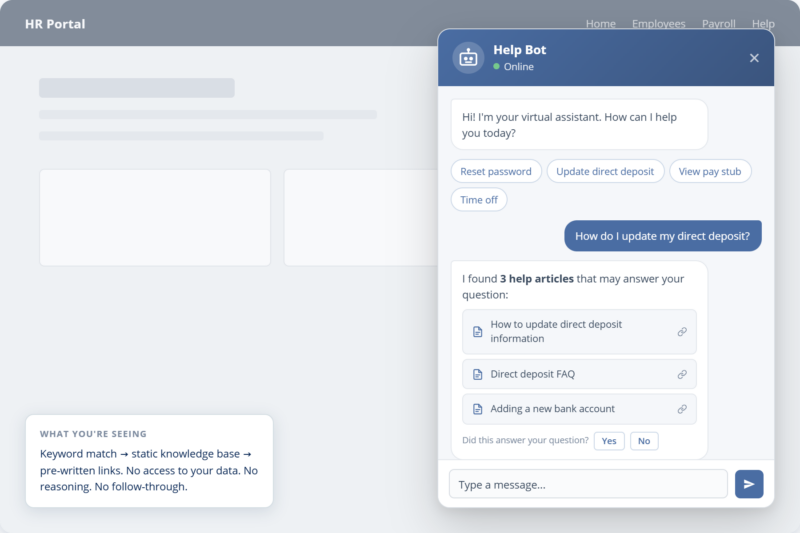
A chatbot matches your input to pre-written responses or knowledge base articles. An AI assistant reasons about your question, accesses live data, performs real-time analysis, and delivers a direct answer. The distinction matters because only one of them actually saves you time.
The HCM market has an AI problem. It’s not about what the technology can do, but about how it’s labeled. Almost every major vendor now offers something called an AI assistant, an intelligent chatbot, or sometimes, an AI agent. These terms are used loosely and often mean the same thing. But when you use these tools, most only do one of three things:
- Search a knowledge base and return links to help articles
- Recommend which report to run and how to find it
- Answer common FAQ-style questions with scripted, pre-written responses
That isn’t real artificial intelligence. It’s just a search bar with a chat feature.
When evaluating solutions, try asking a vendor: “If I ask for current overtime costs by department, will your tool give me an actual answer or just tell me which report to run?” Another good test: “Can I ask the assistant to model the impact of a proposed raise for my salaried employees and get a dollar breakdown instantly?” Questions like these quickly reveal whether you are looking at a genuine AI assistant or just another chatbot.
Put simply, a chatbot points you to the answer. An AI assistant gives you the answer.
The most useful way to evaluate any AI claim is a simple three-level framework that is tied to the comprehensive HCM architecture:
Level 2: AI Assistant
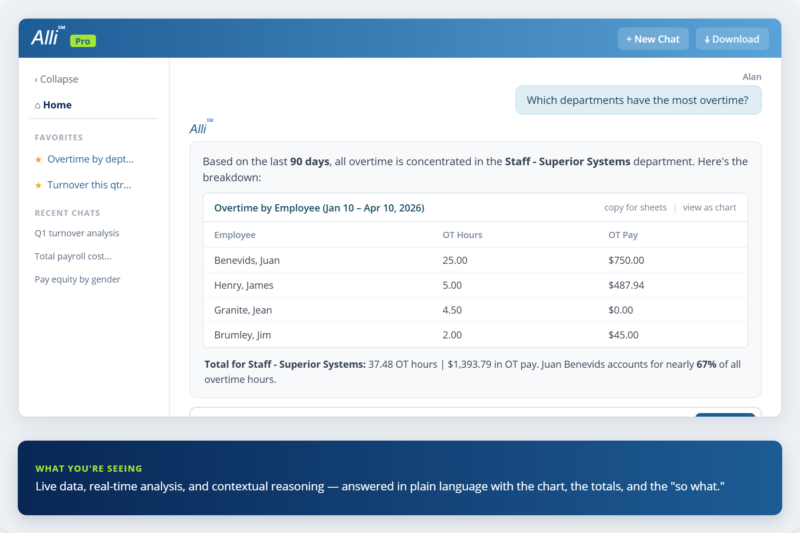
It accesses live data, does real-time analysis, understands context, and guides users through tasks in a conversational way. This is where the real value starts. This layered definition of AI tools aligns with the industry-standard generative AI taxonomy in HR used by leading analysts.
Level 3: AI Agent
It can plan and take action in the system on its own, such as submitting payroll, approving requests, or running workflows, without being prompted each time. Almost no HCM vendors have reached this level, even if their marketing says otherwise.
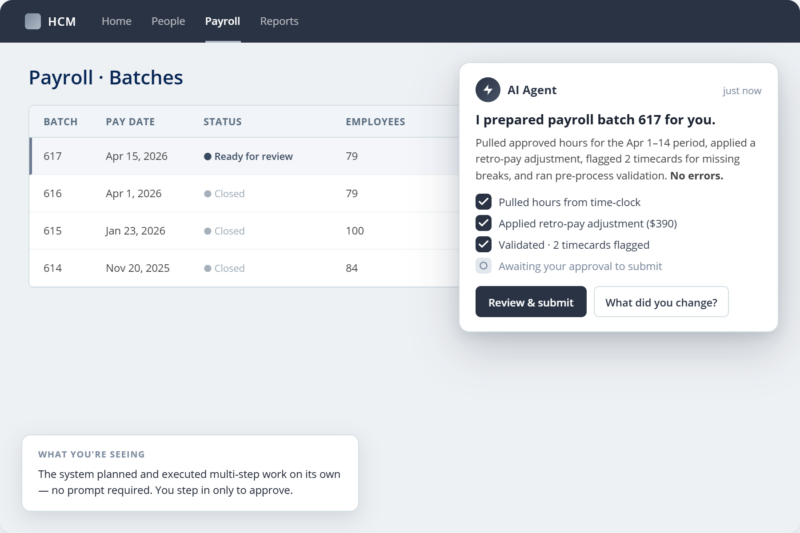
While true AI agents are still emerging across the industry, this area is evolving rapidly and is on our roadmap for future updates. We are tracking new developments closely and will share more as capabilities progress.
When a vendor calls something an agent, ask what it really does. If it just finds help articles and tells you which report to run, that’s still Level 1, no matter what the pricing page says.
Why Is There Always a Gap Between Your Question and the Answer?
Most HR chatbots recommend reports because they are built on Level 1 ‘Knowledge Base’ architecture. They are designed to search static help documents for keywords, rather than executing active queries on your live payroll data.
There’s a reason this friction has persisted so long without much complaint: each report request feels small. Eight minutes here. Twelve minutes there. Nobody files a ticket about a ten-minute inconvenience. And no one thinks about the financial risk of outdated technology. When you add up those moments over a week for a payroll or HR team, it becomes a bigger issue.
That isn’t real artificial intelligence. It’s just a search bar with a chat feature.
The truth is, most are “Knowledge Base” bots, designed to retrieve help documents and pre-written scripts, not to directly access, query, or perform calculations on your live payroll and HR data.
The Hidden Math: The Context-Switching Tax (L)
L = (Tsearch + Texport + Tformat) + 15 minutes (recovery time)
Every time a chatbot gives you “homework” instead of an answer, you lose the time spent running the report (T) plus the 15 minutes of cognitive “ramp-up” time required to get your brain back to your original strategic workflow.
(20 data requests/week × 10 min) = 3.3 hrs/week per admin. At $30/hr, that’s ~$3,200/year in answer latency— time lost between the question and the clarity— completely excluding the context-loss tax.
That’s not just a small detail. It’s a real cost, and it adds up for everyone on your team who uses the platform.
There’s also a trust cost, not just a time cost. When a stakeholder asks a question and it takes fifteen minutes to answer, or the answer comes in a spreadsheet the next day, it sends the message that data isn’t easy to get. Over time, this shapes how much leadership relies on HR and payroll teams for strategic advice. Teams that can answer quickly get more questions. Teams that can’t, don’t.
4 Critical Payroll Questions Your Current Chatbot Can’t Answer
Let’s make this real. Here are four questions a payroll administrator or HR manager might ask their platform on any day, and how a Level 1 chatbot’s answers compare to a true AI assistant’s responses.
| Situation | Typical HCM Chatbot | Alli |
|---|---|---|
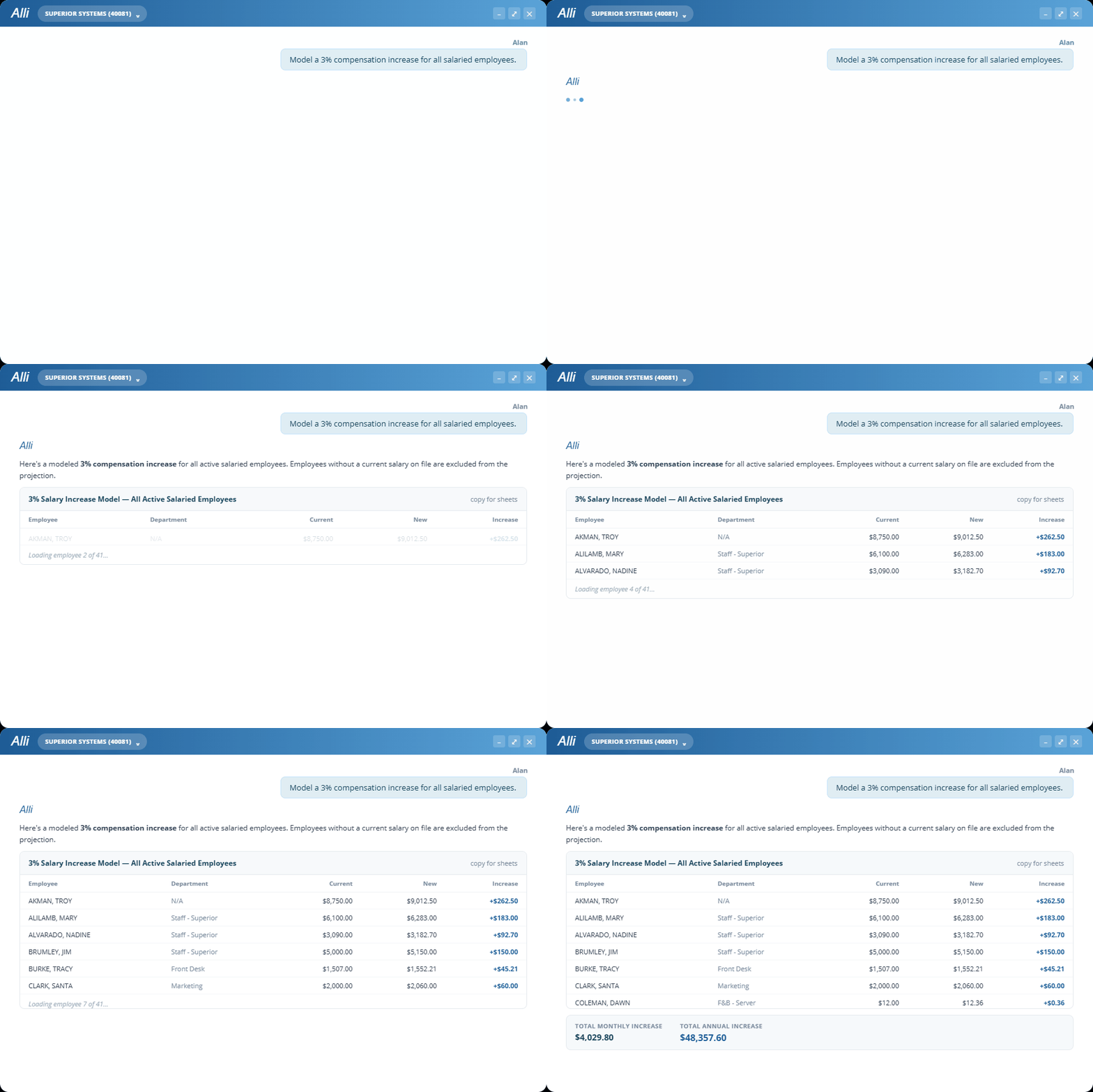
| "What would a 3% raise cost for salaried staff?" | "Here's how to run the Compensation Summary report." | Models the scenario with per-employee and total annual cost — instantly. |
| "Which employees are approaching ACA eligibility?" | "Here's a link to our ACA Eligibility article." | Pulls live eligibility data and flags employees approaching the threshold. |
| "Show me overtime costs by department last month." | "You can find that in the Time & Labor report. Here's how to access it." | Returns a ranked breakdown of OT hours and dollars by department, with a chart. |
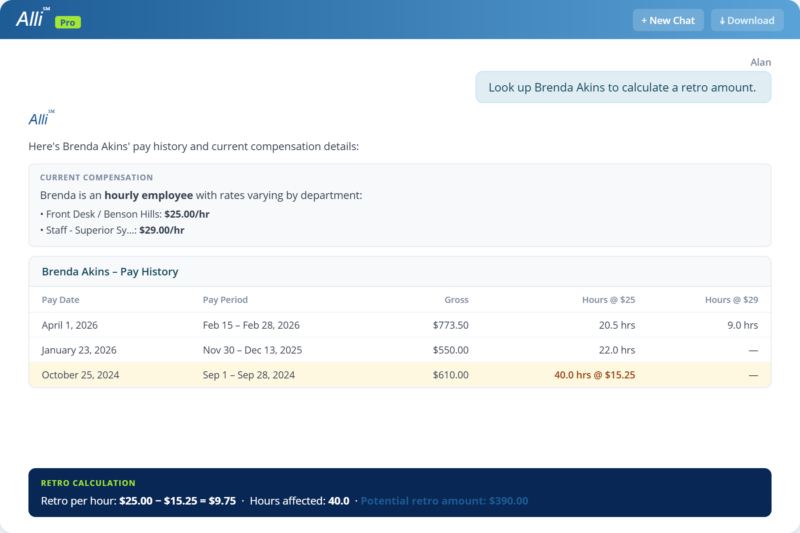
| "An employee missed a raise. What do we owe in back pay?" | "Here's our article on retroactive pay calculations." | Calculates the exact retroactive amount per pay period based on the rate change date and ensures federal payroll tax compliance. |
The pattern is clear: the chatbot knows about your data, but the AI assistant actually knows your data.
That difference between knowing where to find something and actually knowing it is the real gap. And it’s a big one.
What Does a Real AI HR Assistant Do Differently?
The gap between a Level 1 chatbot and a Level 2 AI assistant isn’t just theory. It’s the difference between a tool that adds work and one that removes it. Alli, built into the APS platform, is designed to be the second kind.
Here’s what that looks like in practice:
Instant Answers from live data
Live data is information accessed and analyzed directly from your active HCM system at the moment of inquiry, ensuring you receive answers based on the most current, real-time status of your payroll, HR, and employee records.
Alli connects directly to your live APS data. When you ask about headcount, payroll costs, overtime, compliance status, or compensation, she doesn’t send you to a report. She pulls the answer from your system and delivers it in seconds, using current data and formatting it for your needs.
Security and privacy are top priorities: Alli follows strict protocols to protect sensitive HR information. All data is handled securely in compliance with industry standards, so your information stays confidential and protected at every step.
Real analysis, not just retrieval
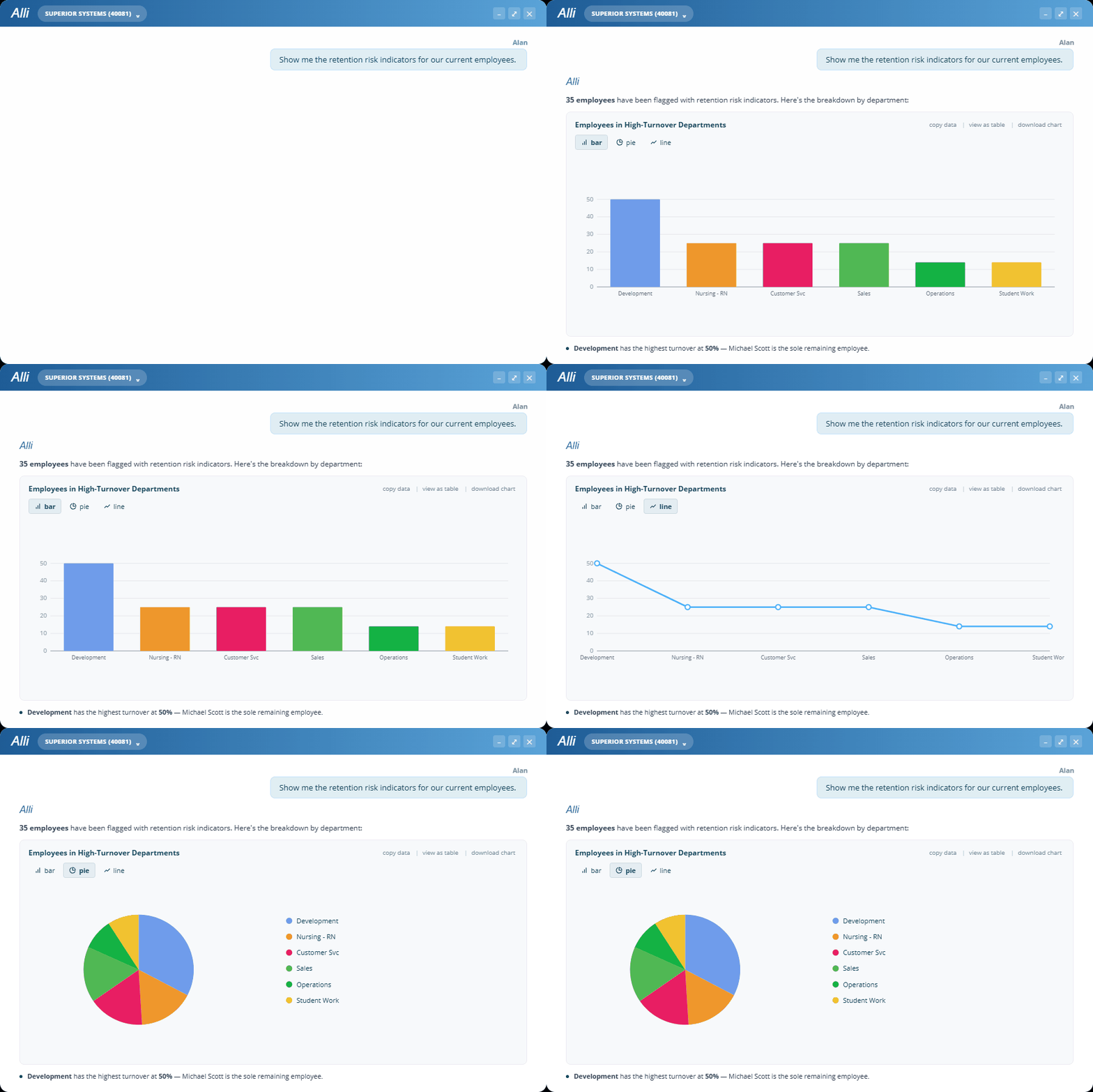
Getting a number is one thing. Understanding it is another. Alli can model what a 3% raise would cost for your salaried staff, calculate the exact retroactive pay owed when a raise was missed, identify employees nearing ACA eligibility, and show overtime trends by department.
This process used to take a spreadsheet and a quiet hour.
Platform guidance that actually guides
For tasks you do less often, like terminating an employee, setting up a new benefit plan, or processing a payroll adjustment, Alli guides you through each step in context. Not just a link to an article or a PDF, but real step-by-step help for your specific task in your own APS system, right in the same conversation.

Answers that lead somewhere
A real AI assistant stands out in what happens after you get an answer. Alli suggests smart follow-up questions based on what you just asked, helping you dig deeper without needing to know the next step yourself. That’s important. The best analysts don’t just answer your question—they help you see what to ask next.
The Gap Between Your Question and Your Answer Is Gone: Meet Alli
The gap between asking a question and getting the answer has persisted long enough that it started to feel inevitable. It isn’t. The latency is the limitation — and it’s gone.
Ready to see what it’s like just to ask and actually get an answer? Alli is coming soon to APS customers.