
Employee Time-Tracking Best Practices: A Guide for HR and Payroll Teams
Payroll errors cost U.S. businesses an average of 1.2% of total payroll annually, according to the American Payroll Association. A significant share of those errors start with inaccurate or inconsistent time tracking. Whether your team uses paper timesheets, punch clocks, or digital systems, the practices behind time capture matter as much as the tools.
Summary
This guide emphasizes that accurate time tracking is a legal obligation under the FLSA, requiring employers to maintain records for at least 3 years and to compensate for all known hours worked, including unauthorized or remote work. We detail best practices, including using a unified time and payroll system, setting clear time-entry deadlines, and mandating manager approval before payroll processing.
This article cautions against rounding rules that systematically benefit the employer (a common FLSA violation) and highlights the critical role of employee self-service in detecting and correcting errors immediately. APS offers unified attendance and payroll functionality, supporting manager approval workflows and mobile employee self-service access.
Why Time Tracking Matters Beyond Payroll Accuracy
Accurate time tracking is a legal obligation, not just an operational preference. The FLSA requires most employers to maintain records of hours worked for non-exempt employees for at least three years. Failure to keep adequate records does not protect you in a wage dispute. If records are missing or incomplete, courts often allow employees to offer their own estimates of hours worked, and the burden shifts to the employer to disprove them.
Beyond compliance, accurate time data powers better business decisions. Labor cost reports, overtime trend analysis, productivity metrics, and project billing all depend on reliable time records. Organizations that invest in clean time data find it easier to forecast staffing needs, identify scheduling inefficiencies, and defend against wage claims when they arise.
Define Your Workweek and Communicate It Clearly
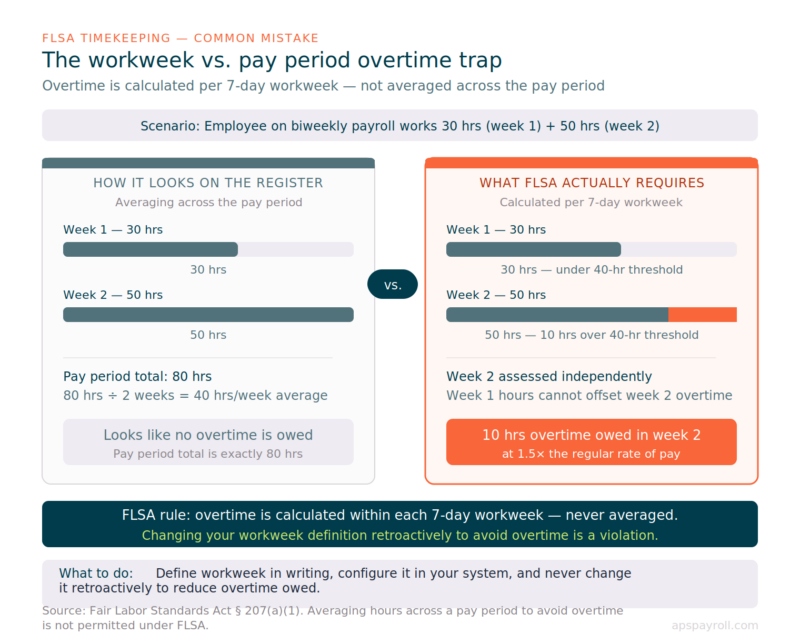
The FLSA requires employers to establish a fixed workweek: a regularly recurring 168-hour period of seven consecutive 24-hour periods. Overtime is calculated within this workweek, not across a pay period. This distinction trips up more payroll teams than almost any other concept in wage and hour law.
Consider a biweekly payroll: an employee works 30 hours in week one and 50 hours in week two. Their total for the pay period is 80 hours, which looks clean on the payroll register. But under the FLSA, week two standing alone generated 10 hours of overtime. Averaging across the pay period is not permissible.
Document your workweek definition — the specific day and hour it begins — in writing. Include it in your employee handbook, post it wherever employees access scheduling information, and configure it in your time and attendance system so overtime calculations trigger correctly. Changing the workweek after the fact to avoid overtime is a FLSA violation. If you need to change your workweek definition for legitimate business reasons, the change must apply prospectively, be documented, and not be designed to evade an overtime obligation that has already accrued.
Best Practices for Employee Time Tracking
1: Use a Unified Time and Payroll System
Separate time tracking and payroll systems create a transfer point where errors enter. When timesheets are exported from one platform and imported into another, data can be changed by formatting differences, rounding rules, decimal precision issues, or manual re-entry mistakes. Any one of these introduces a gap between what the employee worked and what they get paid.
The problem compounds in organizations with multiple pay codes. An employee who earns a regular rate, a shift differential, on-call pay, and holiday pay generates a complex time record. When that record travels through a manual export-import workflow, the chance of a code being dropped, duplicated, or mapped incorrectly is real. The error might be a few dollars per employee per pay period — small enough to go unnoticed, large enough to create significant back-pay liability over time.
A unified platform eliminates this risk by design. Time-capture data flows directly into payroll calculations without leaving the system. The pay stub reflects what the employee actually worked, using the same data entered once at the clock. APS unifies time capture and payroll in a single database, so there is no download-and-upload step, no format conversion, and no manual reconciliation between what employees clock and what they get paid.
When evaluating whether to unify your systems, ask your payroll team one question: how long does it take to reconcile time records to payroll each period? If the answer is more than a few hours, a manual transfer process is likely the cause — and a unified system would recover that time every cycle.
2: Establish a Clear Time-Entry Deadline
Timesheets that arrive after payroll processing deadlines force manual adjustments or create off-cycle payments. Both outcomes consume staff time, introduce errors, and erode confidence in the payroll process. Late time entries are one of the most common — and most preventable — sources of payroll disruption.
The right deadline depends on your pay frequency and the size of your team. As a starting point, set submission deadlines 24 to 48 hours before payroll processing begins. This window gives supervisors time to review and approve hours, catch missed punches, and flag anomalies before the payroll run locks. For weekly payroll with a large hourly workforce, 48 hours is the safer choice. For semimonthly payroll with a smaller salaried team, 24 hours may be sufficient.
The deadline only works if employees know it exists and receive reminders before it passes. Configure your time and attendance system to send automated notifications — an email or mobile push notification the morning the deadline falls is more effective than a static policy document no one reads. A second reminder two hours before cutoff catches the stragglers.
It is also worth auditing which employees miss the deadline repeatedly. Chronic late submitters often have one of two problems: they do not understand the process, or the process is harder than it needs to be. Both are fixable. For employees who miss because of a confusing interface or unclear instructions, targeted retraining usually solves it. For employees working unusual schedules who simply cannot submit before the deadline, consider whether your cutoff is realistic for their situation, or whether a manager can be designated to submit on their behalf.
3: Require Manager Approval Before Processing
Employee-submitted timesheets should require a supervisor review before payroll runs. This step catches missed punches, unapproved overtime, schedule mismatches, and data entry errors before they become paycheck problems. It is also your first line of defense against wage claims — a properly documented approval trail shows that hours were reviewed by someone with direct knowledge of the employee’s schedule.
Approval workflows only work when supervisors take them seriously. In many organizations, managers approve timesheets in bulk without reviewing individual entries, treating the step as an administrative formality. This is sometimes called rubber-stamp approval, and it defeats the purpose entirely. When a wage dispute surfaces six months later, a record showing that every timesheet was approved in under 30 seconds does not demonstrate meaningful oversight.
To make approval meaningful, configure your system to surface anomalies for manager attention. Entries that are significantly higher or lower than the employee’s scheduled hours, overtime that exceeds a threshold, or punch patterns that do not match the scheduled shift should flag automatically rather than requiring the supervisor to spot them manually. The goal is not to make approval burdensome — it is to make it targeted. Most timesheets in a well-run system require no intervention. Flags ensure the ones that do get proper attention.
Document the approval workflow clearly and keep records of who approved what and when. If an employee files a wage claim alleging they worked hours that were not paid, your approval records are the primary evidence that hours were reviewed and compensated. Without that trail, the employer’s position weakens considerably.
4: Track All Work, Including Remote and Off-Clock Activity
Under the FLSA, employers must compensate employees for all hours they know or should know are worked, even if those hours were not authorized. This is one of the most frequently misunderstood rules in wage and hour law. An employer cannot avoid overtime liability by instructing an employee not to record overtime after that overtime has already been worked. The obligation attaches to the work, not the recordkeeping.
This principle is particularly consequential for remote and hybrid employees. A remote worker who responds to emails before her official start time, joins a call during her lunch break, or finishes a deliverable after her scheduled end has worked compensable time — even if she never formally clocked in for those minutes. If the employer knows or has reason to know this is happening (because the email timestamps are visible, because the supervisor was on the call, because the file was submitted after hours), the FLSA requires compensation.
The practical steps to manage this risk:
- Update your written timekeeping policy. Your policy should explicitly address remote and hybrid work, define what constitutes compensable time, and give employees clear guidance on how to record it. A policy that only describes how to use a punch clock does not address the realities of remote work.
- Train managers on what to look for. Supervisors who regularly see after-hours email responses, early-morning messages, or task completions outside of scheduled hours should understand that those signals may indicate unrecorded compensable time. They should know how to raise it with the employee and how to ensure hours are captured correctly.
- Create a frictionless process for employees to report additional time. If an employee worked 20 minutes before their shift to help with a transition, there should be a simple way for them to add that time to their timesheet. If the only way to report additional time is a complicated exception process, employees will absorb the loss rather than navigate it — and you will carry the compliance risk.
- Set clear expectations on after-hours contact. If your organization uses messaging tools like Slack or Teams, employees may feel implicit pressure to respond outside their scheduled hours. A documented policy on after-hours communication expectations, combined with guidance on when that communication is or is not compensable, removes ambiguity for both employees and managers.
5: Audit for Common Timekeeping Errors Regularly
Schedule quarterly reviews of your time and attendance data to look for patterns that indicate systemic problems. Individual errors are inevitable in any workforce. Patterns are the signal that something structural needs fixing.
| Error Pattern | Likely Cause | Corrective Action |
|---|---|---|
| Many timesheets submitted past deadline | No automated reminders; process too complex | Set up reminder notifications; simplify submission |
| Recurring missed punches by the same employees | Unclear policy or system confusion | Retrain; evaluate whether clock-in method fits workflow |
| Overtime spikes at end of pay period | Pay period confusion with workweek | Clarify workweek boundaries in training and policy |
| Timesheets approved without edits, every time | Rubber-stamp approvals | Train supervisors; add anomaly flags to approval workflow |
| Rounded time consistently benefiting employer | Over-aggressive rounding rules | Review rounding policy for FLSA compliance |
| High volume of after-the-fact corrections | Deadline too early; process unclear | Extend deadline buffer or simplify correction workflow |
When you find a pattern, resist the instinct to solve it by adding more policy language. Employees who repeatedly miss punches are usually dealing with a process that does not fit how they actually work, not a gap in their knowledge of the employee handbook. The fix is almost always a process change — a more accessible clock-in method, a better reminder, a shorter approval chain — rather than a longer policy.
Quarterly audits also give you a defensible record of diligence if a wage claim arises. Showing that your organization regularly reviewed timekeeping data and corrected issues proactively is significantly better than having no review history at all.
FLSA Rounding Rules: What Is and Is Not Permissible
Many employers round employee time to the nearest 5, 6, or 15 minutes. The FLSA permits rounding only if the policy averages out over time so that employees are not systematically underpaid. A rounding practice that consistently benefits the employer — even slightly — violates the FLSA.
The 15-minute rounding rule is the most common and the most scrutinized. Under it, an employee who clocks in at 8:07 would have their time recorded as 8:00, and an employee who clocks in at 8:08 would have their time recorded as 8:15. In theory, these round up and down in equal measure. In practice, studies of large employee populations have found that rounding often skews slightly in the employer’s favor because employees tend to clock in a few minutes early but clock out at or near their scheduled end time.
Several court decisions in recent years have tightened scrutiny of rounding practices, and at least one federal court has ruled that rounding is impermissible if the employer’s timekeeping system can capture exact times. If your system can record actual clock-in and clock-out to the minute, using exact times eliminates the rounding question entirely and removes a meaningful category of legal risk.
If you currently round and want to understand your exposure, run an analysis comparing the total hours recorded under your rounding policy against what would have been recorded using actual punch times over a 12-month period. If the rounding policy produced fewer hours than exact times would have, your employees have been systematically underpaid and you have a back-pay liability.
6: Apply Consistent Break and Meal Period Policies
The FLSA does not require employers to provide meal or rest breaks, but when breaks are offered, it governs precisely how they must be compensated. Short rest breaks of 20 minutes or less are compensable — they count as work time and must be paid. Bona fide meal periods of 30 minutes or more are not compensable, as long as the employee is fully relieved of all duties for the duration.
The compliance problem almost always lives in the gap between written policy and actual practice. Consider the most common scenario: your policy states that employees receive a 30-minute unpaid lunch. Your data shows that a significant share of employees clock back in after 20 or 22 minutes. Those employees technically took a rest break, not a meal period, which means those 20 minutes should have been paid. If the pattern holds across dozens of employees over multiple pay periods, the underpayment adds up — and so does the liability.
Several circumstances automatically make a meal period compensable even if the employee steps away from their workstation:
- The employee is required to remain on-call and respond to issues during the break
- The employee is interrupted for work reasons during a substantial portion of the break
- The break is shorter than 30 minutes, even if the policy says otherwise
- The employee is required to eat at their desk or workstation
The practical fix is to align your policy with what actually happens. If your employees routinely take 20-minute breaks, redesign the policy around 20-minute paid breaks rather than treating 30 minutes as the standard and hoping the gap goes unnoticed. Alternatively, build a system-level control: configure your time and attendance platform to flag meal periods that fall short of the 30-minute threshold so managers can review them before payroll runs.
State laws often impose stricter requirements than the FLSA. California, for example, requires a 30-minute unpaid meal break for shifts over five hours, with significant penalties for missed or short breaks. New York, Oregon, and several other states have similar provisions. If you operate in multiple states, your break policy needs to reflect the strictest applicable standard in each jurisdiction, or be configured at the state or location level within your HRIS.
7: Enable Employee Self-Service Access to Time Records
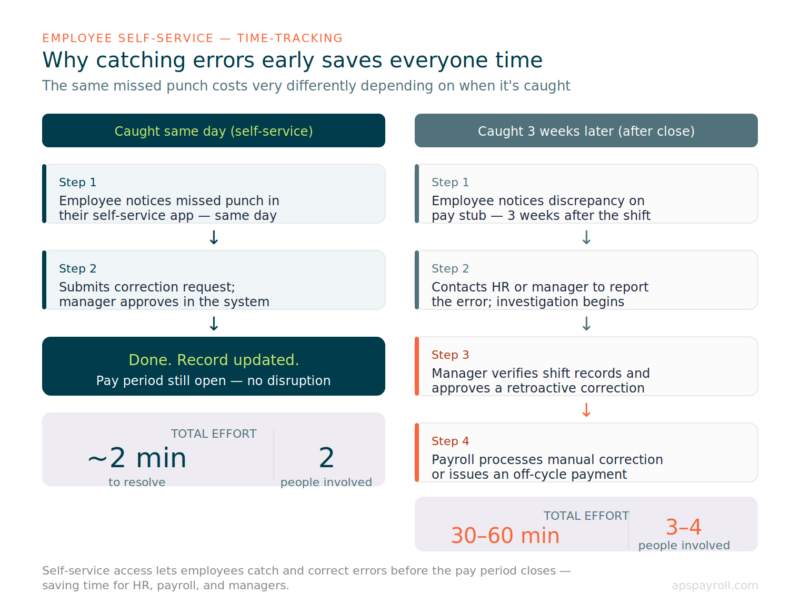
Employees who can review their own time records in real time catch errors faster than any audit process. When an employee notices a missed punch the day it happens, the correction takes two minutes: they submit a request, the manager approves it, and the record is updated before payroll runs. When the same missed punch surfaces three weeks later — after the pay period has closed — the resolution requires manager verification, a payroll correction request, documentation for the audit trail, and potentially an off-cycle payment. What was a two-minute fix becomes a multi-step process consuming time across two or three people.
This is not a marginal efficiency gain. In organizations with large hourly workforces, missed punch corrections are among the most common administrative tasks HR and payroll teams handle. Every one that gets caught and corrected before the pay period closes is one fewer exception to process after.
Self-service access also changes the compliance dynamic. Employees who can see their own time records are much more likely to notice if their hours look wrong — and much more likely to raise the issue immediately rather than letting it accumulate. This is a feature, not a risk. Organizations that fear giving employees access to their time data often discover that the bigger risk was employees not catching errors that quietly compound into a wage claim.
For hourly and frontline workers, the self-service tool must be mobile-first. An employee who works a 6 AM hospital shift is not going to log into a desktop portal at 8 PM to review their timesheet. If the tool does not work well on a phone, it will not get used. When evaluating time and attendance platforms, test the mobile experience as rigorously as the desktop interface — and test it with the kinds of employees who will actually use it, not just the HR team.
APS includes a mobile self-service app that gives employees visibility into their time records, pay stubs, and accrual balances from any device. Employees can view their punch history, submit missed-punch corrections for manager approval, and see their current and projected PTO balances — all without contacting HR.
Time Tracking for Specific Industries
Time-tracking complexity varies significantly by industry. The baseline FLSA requirements apply broadly, but the operational realities of specific sectors introduce additional layers that a generic timekeeping process handles poorly.
- Healthcare organizations deal with multiple pay codes applied to the same employee within a single shift: a base rate, a shift differential, on-call pay, charge nurse pay, and callback rates can all activate depending on what the employee is doing and when. The 8-and-80 overtime rule adds another calculation layer that requires correct workweek configuration. A time and attendance system that cannot apply these rules by unit, shift, and employee classification forces payroll teams to calculate premiums manually — which is both error-prone and not scalable.
- Restaurants and hospitality employers manage tip credits, multiple job codes within a single shift (a server who also performs host duties may have two pay rates in one day), and split-shift premiums under some state laws. Manual time tracking for a workforce of 40 servers, bartenders, and bussers creates a compounding error risk that grows with every shift.
- Manufacturing operations need time records that track not just hours worked but which cost center, job code, or project those hours apply to. Labor distribution data ties directly to job costing and project profitability. When time records cannot support that level of detail, the accounting team manually allocates labor costs — which is imprecise and time-consuming.
- Nonprofits and higher education institutions with grant-funded positions must document how employee time is allocated across funding sources. Federal grant regulations under OMB Uniform Guidance require contemporaneous records showing the actual distribution of effort by project. A timekeeping system that cannot support multi-source allocation makes effort reporting a manual exercise prone to audit findings.
In each of these industries, the right time-tracking system is one that reflects the actual pay rules and reporting requirements in place — not a generic tool configured to the lowest common denominator.
Frequently Asked Questions
What records does the FLSA require employers to keep?
For non-exempt employees, the FLSA requires records of: employee’s full name and Social Security number, address, date of birth (if under 19), sex, occupation, workweek beginning day and hour, hours worked each day and week, basis of pay, total regular and overtime earnings, deductions, and net wages paid. Records must be kept for at least three years.
Can employers use electronic timekeeping systems?
Yes. The FLSA does not specify the format of timekeeping records. Electronic systems are acceptable as long as they produce accurate, accessible records. Electronic records also typically make it easier to produce documentation in a wage dispute than paper-based systems.
What is a reasonable time-entry deadline for employees?
Most organizations set submission deadlines 24 to 48 hours before payroll processing begins. The right deadline depends on your pay frequency and workforce size. Weekly payroll with a large hourly workforce typically needs 48 hours. Semimonthly payroll with a smaller team may work with 24 hours.
Are there time-tracking requirements for exempt employees?
The FLSA does not require tracking hours for exempt employees, since overtime does not apply. However, many organizations track exempt employee time for project management, client billing, or internal resource planning. If an employee classified as exempt spends significant time on work that falls outside their exempt duties, their classification may need to be reviewed.
How should we handle employees who forget to clock in?
Establish a missed-punch correction process. Employees submit a correction request, the manager verifies and approves it, and the correction is documented in the system. The corrected entry should include the reason for the change and the manager’s acknowledgment. Never add hours without a documented approval trail.
What is the risk of buddy punching?
Buddy punching — one employee clocking in for another — is a form of time theft that inflates labor costs and creates inaccurate records. Biometric time clocks, photo verification at clock-in, and manager audits of punch patterns that do not match schedules all reduce this risk. Organizations with significant buddy punching exposure should consider biometric verification as a standard feature requirement when selecting a time and attendance system.
Does APS offer time and attendance tracking?
Yes. APS includes integrated Attendance functionality that connects directly to payroll, eliminating manual data transfer. The platform supports multiple clock-in methods, manager approval workflows, automated reminders, anomaly flagging, and employee self-service access from mobile devices.
Enhance Your Employee Time-Tracking Process
Effective employee time tracking is essential for accurate payroll, compliance, and productivity management. Choosing the right tools, setting clear policies, and regularly reviewing data can create a seamless time-tracking process that benefits your business and your employees. APS supports your time-tracking needs, providing comprehensive solutions that streamline your operations. Contact us today for more information on how APS can assist with your time-tracking requirements.