
If you’re currently evaluating payroll vendors, you’re probably sifting through a lot of feature-checklist content. That information isn’t wrong—but it doesn’t always help you compare vendors or make a confident decision.
What’s more, choosing the wrong payroll software can create a liability for your business. Tax penalties, compliance failures, and hours of manual reconciliation are rarely the result of bad luck. They’re usually the result of a buying decision made without the right framework.
We created this guide for HR managers and business owners who are actively shortlisting vendors and need to move from identifying features to making a final selection. We outline key decision criteria, essential questions to ask vendors, and common mistakes that often lead companies to switch systems within a year of implementation.
Why Payroll Software Is a Strategic Decision (Not Just a Tool Purchase)
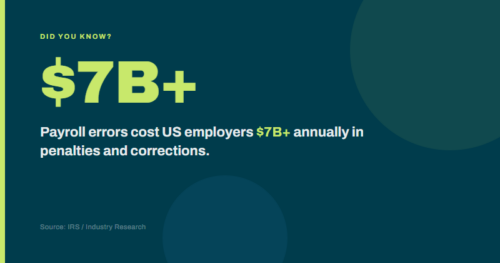
Payroll errors cost US employers over $7 billion annually in penalties and corrections. This figure underscores the importance of making an informed decision.
Financial costs are only one aspect. Payroll delays, errors, or compliance issues can erode employee trust in ways not reflected in financial statements. Additionally, when payroll operates separately from HR, benefits, and time-tracking systems, your team spends unnecessary time manually reconciling data that should be integrated across these systems.
This is why the shift toward unified Human Capital Management (HCM) platforms matters. It’s not about buying more software—it’s about eliminating the seams between systems where errors tend to accumulate.
Mid-market companies face a specific version of this challenge. You’re past the point where a basic payroll tool is sufficient, but you may not have the internal resources of a large enterprise to absorb manual workarounds. The right payroll software for your business should handle compliance complexity without requiring a compliance expert on staff—and it should scale as your headcount, locations, and regulatory footprint grow.
Step 1: Define Your Requirements Before You Start Shopping
Before requesting any demos, document your specific requirements. Vendors will highlight impressive features, but it is essential to focus on what matters most for your organization.
- Company size and growth trajectory. Where are you now, and where will you be in three years? A system that works well at 75 employees may become a bottleneck at 200. If you’re planning geographic expansion, you need to think about multi-state payroll from day one, not after the fact.
- Industry-specific compliance requirements. Healthcare, hospitality, faith-based organizations, education, and manufacturing each carry payroll compliance nuances—from tip reporting to housing allowances to grant-based funding restrictions. Your vendor should have demonstrable experience in your industry, not just a general-purpose platform.
- Integration requirements. What systems does payroll need to talk to? Your HCM, benefits administration platform, time and attendance system, and accounting software all need to share data with payroll. The quality of those integrations—and whether they’re native or bolted-on—will significantly affect how much manual work your team does.
- Internal HR capacity. Do you have a dedicated payroll or HR team, or is payroll one of many responsibilities for a small HR generalist staff? Your answer should influence how much weight you give to vendor support, implementation assistance, and ongoing service.
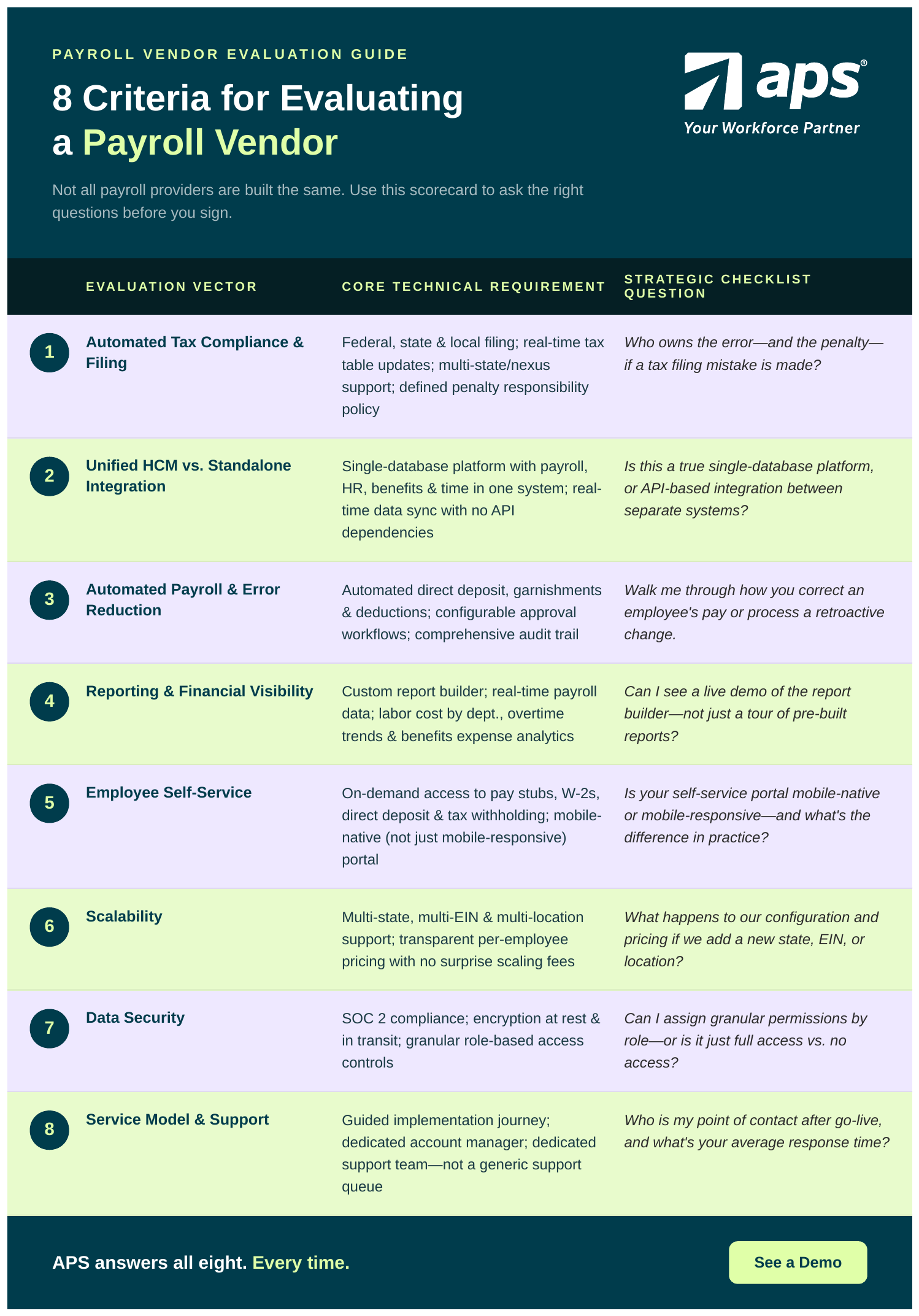
The 8 Criteria That Matter
-
Automated Tax Compliance and Filing
This tends to have the highest downside risk if you get it wrong. When evaluating vendors, don't just ask whether they file taxes—ask who owns the error if something goes wrong. The best platforms handle federal, state, and local tax filing on your behalf, maintain real-time tax table updates, and have clear policies around penalty responsibility. If a vendor's answer to "who pays if you make a mistake?" is vague, that's a meaningful signal. Also, ask about multi-state compliance. If you have remote employees, or plan to, you need a system built to handle nexus complexity—not one that requires manual configuration every time an employee moves.
-
Built Into a Unified HCM vs. Standalone Payroll Software Integration
A standalone payroll system is not the same thing as a payroll system that's part of a unified HCM platform, even if both advertise "integration." Integration via API means two separate systems exchange data, dependencies, sync delays, and failure points. A single-database platform means payroll, HR, benefits, and time data live in the same system and are updated in real time. The practical difference is that when an employee gets a promotion, changes their address, or updates their direct deposit, those changes should automatically propagate throughout the system. In a disconnected environment, someone has to manually update each system—and that's where errors creep in.
-
Automated Payroll Software and Error Reduction
Manual payroll processes are prone to errors. Look for a system that automates direct deposit, garnishments, and deductions, supports configurable approval workflows, and maintains a comprehensive audit trail. Ask vendors to walk you through their processes for correcting an employee's pay or for retroactive changes. The complexity of their answer will tell you a lot about how much manual intervention you'll actually need.
-
Reporting and Financial Visibility
Standard payroll reports are table stakes. What differentiates platforms is whether you can build custom reports, access real-time payroll data, and pull the analytics your finance team actually needs—labor cost by department, overtime trends, benefits expense breakdowns—without exporting to a spreadsheet and building it yourself. Ask for a demo of the report builder, not just a tour of reports.
-
Employee Self-Service
Employees today expect access to their pay stubs, W-2s, direct deposit settings, and tax withholding information on demand—ideally from their phones. Every hour your HR team spends fielding routine employee payroll questions is an hour not spent on higher-value work. Mobile access is no longer optional for organizations with distributed, deskless, or hybrid workforces. Ask vendors whether the self-service portal is mobile-native or just mobile-responsive—they're not the same experience.
-
Scalability
The system you choose today needs to work for the company you're becoming, not just the company you are now. Ask vendors directly: what happens to our configuration, workflows, and pricing if we add a new state, EIN, or location? Pay close attention to pricing models as you scale. Per-employee pricing can lead to significant cost increases at growth inflection points. Understand what the math looks like at your projected headcount in two to three years before you sign.
-
Cloud-Based Payroll Software Data Security
Payroll data is among the most sensitive information your organization holds. At minimum, look for SOC 2 compliance, data encryption at rest and in transit, and role-based access controls that let you specify precisely who can view or edit payroll data. This matters especially as you grow and more people touch HR and finance systems. The ability to grant granular permissions—rather than choosing between "full access" and "no access"—is a practical necessity, not a nice-to-have.
-
Service Model and Support
This is the criterion most commonly underweighted during evaluation—and the one that causes the most regret after go-live. There's a fundamental difference between a vendor that routes you through a generic support queue and one that assigns you a dedicated support team with relevant industry experience. During a payroll error, a compliance deadline, or a complex configuration change, that difference is the difference between a resolved problem and a day-long fire drill. Ask every vendor: What does my support experience look like after implementation is complete? Who is my point of contact? What's the average response time? If the answer sounds like a call center, factor that in when making your decision.
5 Questions to Ask Every Payroll Vendor
Use these questions in every demo and discovery call. The quality and specificity of the answers will tell you more than any feature comparison sheet.
-
What happens if you make a tax filing error—who pays the penalty?
A confident vendor will have a clear, written answer. Vagueness here is a red flag.
-
How long does implementation take, and what does my team have to do?
Get the specifics: the timeline in weeks, the internal resource commitment, the data you need to provide, and what a successful go-live looks like. In our experience, surprises during implementation are one of the leading causes of post-purchase regret.
-
Could you handle a surprise DOL audit?
This question separates vendors who talk about compliance from vendors who've actually lived it. A strong answer includes specific examples of audit support, documentation capabilities, and what your experience as a client would look like if this were to happen.
-
What does support look like after go-live?
Ask for information about your dedicated support team—especially the average response time for support requests and how escalations are handled. If the vendor can't answer this specifically, assume you'll be on your own.
-
How does pricing change if we grow or add locations?
Get the full payroll software pricing model in writing—including what triggers a tier change, the per-employee cost at different headcounts, and whether there are fees for adding states or EINs.
Common Mistakes to Avoid
-
Choosing by price alone.
The cost of switching payroll systems—in time, data migration, retraining, and lost productivity—almost always exceeds whatever you saved on the initial contract. Optimize for total cost of ownership over three years, not the monthly per-employee fee.
-
Not testing integrations before signing.
Vendors will tell you they integrate with your HCM, your time system, and your accounting platform. Make them prove it—with your actual data, not a demo environment. Integration failures discovered after go-live are expensive and disruptive.
-
Ignoring the service model until you need it.
Support quality is invisible during a smooth payroll run. It becomes very visible the first time something goes wrong. Evaluate it proactively.
-
Selecting a system built for a different company size.
Enterprise platforms tend to be over-engineered and under-supported for mid-market companies. SMB-focused tools tend to reach their limits as you scale. Look for vendors that specifically serve companies of your size and have case studies from similar businesses.
How APS Approaches This Differently
At APS, we built our payroll platform for mid-market companies—organizations that have outgrown basic payroll tools but don’t have the internal resources of a large enterprise.
The platform is a single unified system: payroll, HR, benefits administration, attendance, and workforce all on one database. That means no data entry across systems, no reconciliation overhead, and no integration failures between modules that should communicate.
Our service model is built around support. APS clients have a dedicated support team for system issues or questions, as well as an account manager for adoption and success. These relationships extend from post-implementation through every subsequent renewal.
APS has deep experience in industries with specific compliance requirements, including healthcare, hospitality, faith-based organizations, nonprofits, and manufacturing. If your industry carries payroll complexity that generic platforms weren’t built for, that experience matters.
Sources:
- Unpaid Payroll Taxes: Billions in Delinquent Taxes — U.S. GAO
- Publication 15 (2026): Employer’s Tax Guide — IRS
- 55+ Payroll Statistics: The Ultimate Numbers — BusinessDasher
- Improved Business Efficiency Starts With a Single Shared Database — SHRM
- Guide to Choosing a New HCM System — SHRM
- What Is SOC 2 Compliance: Why It Matters for Payroll Data — Payroll Integrations
- SOC 2 Compliance in 2026: Requirements, Controls, and Best Practices — Venn
- Practical Ways to Simplify Payroll and HR with Employee Self-Service — Workforce.com
- Top Trends in Employee Self-Service Technology for 2025 — LITS Services
- Payroll Services Pricing Guide (2026) — People Managing People
- Payroll Service Cost Guide — Forbes Advisor
- The 14 Hidden Payroll Fees Providers Don’t Want You to See — OnTheClock
- 2026 Payroll Compliance Checklist: U.S. Laws & Tax Changes — IRIS Global